


왕초보 가이드
[추천인 변경방법] OKX Referral Code Change Guide 1
To change your referral code on OKX, you need to follow a few simple steps.
Since OKX does not allow referral code changes within the platform,
you must transfer all assets in your account to another exchange or wallet,
then delete your account and proceed with re-registration.
1. Log in to your OKX account
then enter your email address or phone number and your password to access your account.

2. Go to Account Settings
After logging in, click the profile icon at the top right of the screen to open the dropdown menu.
From the menu, select “Security.”

3. Close Your Account
In the Security page, find the “Close account” option.
This option is usually located under the Account Management section.
Click this option to proceed to the account deletion page.
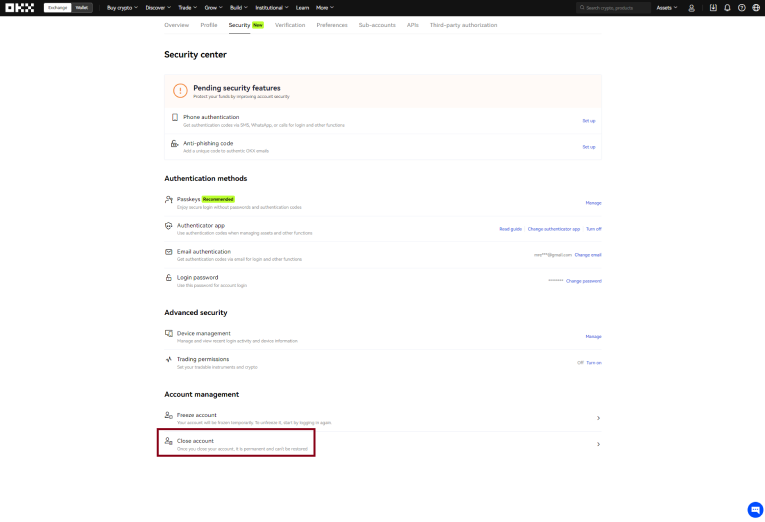
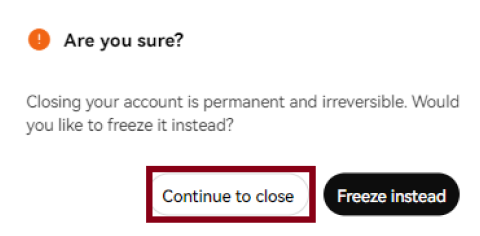
4. Continue to Close
By clicking the button below, you can proceed to delete your account.
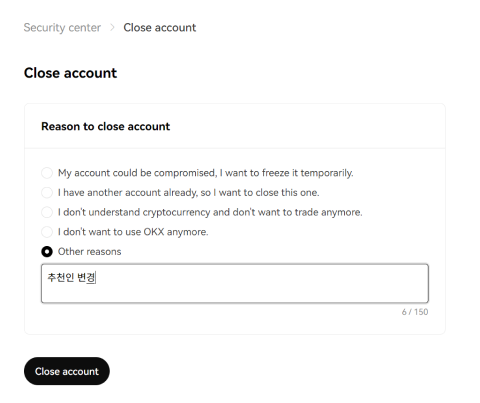
5. Write the final reason
You may simply state that you are deleting the account in order to change the referral code.
 After that, you can re-register by using the link below:
https://www.okx.com/campaigns/jadoodoo-new-sign-up-event-dec-2025?channelid=ilovejadoo
※ Please note that if you re-register using the same ID after deleting your account, the process may take up to 30 days.